
Name Style Generator – Stylish Name Copy and Paste
Type your name once and get 1,300+ stylish names in 18 categories – Free Fire name style, BGMI name style, King & Queen, love, cute and more. Tap Copy and paste it into Instagram, Free Fire, WhatsApp or anywhere else. Free, no sign-up.
Most searched decorated names (copy & paste)
These are the decorations people search for most. Tap one to copy it and replace “Your Name” – or type your name in the box above and the tool builds them with your name.
- ╰‿╯ ϟ 𝚈𝚘𝚞𝚛 𝙽𝚊𝚖𝚎 ✯꧂
- ╰‿╯ ϟ 𝚁𝚊𝚑𝚞𝚕 ✯꧂
- ꧁༒♛ 𝔜𝔬𝔲𝔯 𝔑𝔞𝔪𝔢♛༒꧂
- ꧁༒♛ 𝔎𝔦𝔫𝔤♛༒꧂
- ꧁༒☬ 𝕽𝖆𝖍𝖚𝖑 ☬༒꧂
- ★彡 𝓨𝓸𝓾𝓻 𝓝𝓪𝓶𝓮 彡★
- 『𝐘𝐨𝐮𝐫 𝐍𝐚𝐦𝐞』
- ꧁ ᴘʀɪʏᴀ ꧂
Name styles by category
Open a page made for your game or app – the right category is already selected:
Font generators
Want one font only? These pages show that font first, with decorated versions:
How to Use It (3 Easy Steps)
No sign-up and nothing to install. It works the same on mobile and PC:
- Type your name in the box at the top.
- Tap a category – Free Fire, BGMI, King & Queen, Love… – or search for a symbol like “crown” or “heart”.
- Tap Copy, then paste your stylish name into Instagram, Free Fire, BGMI, WhatsApp or anywhere else.
- Tip: tap ♡ to save a style for later, or ✨ to add random decorations.
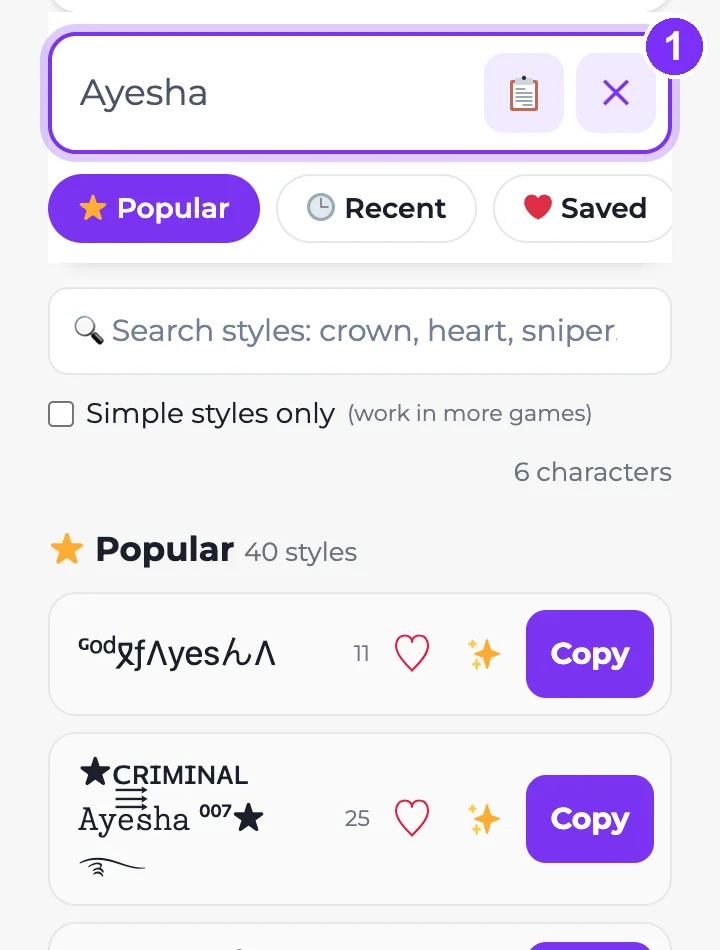
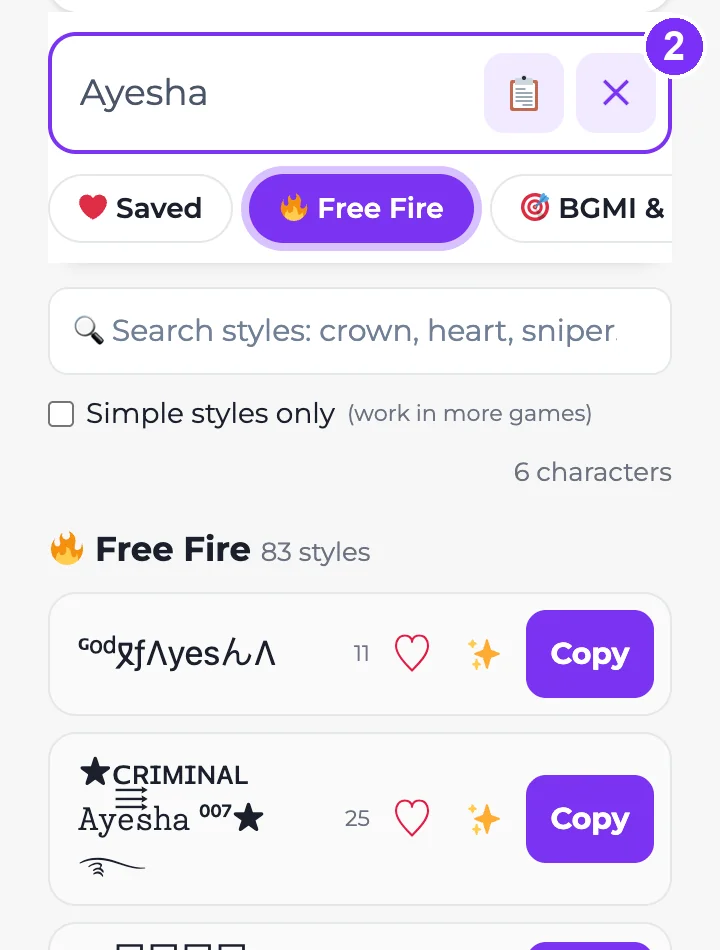
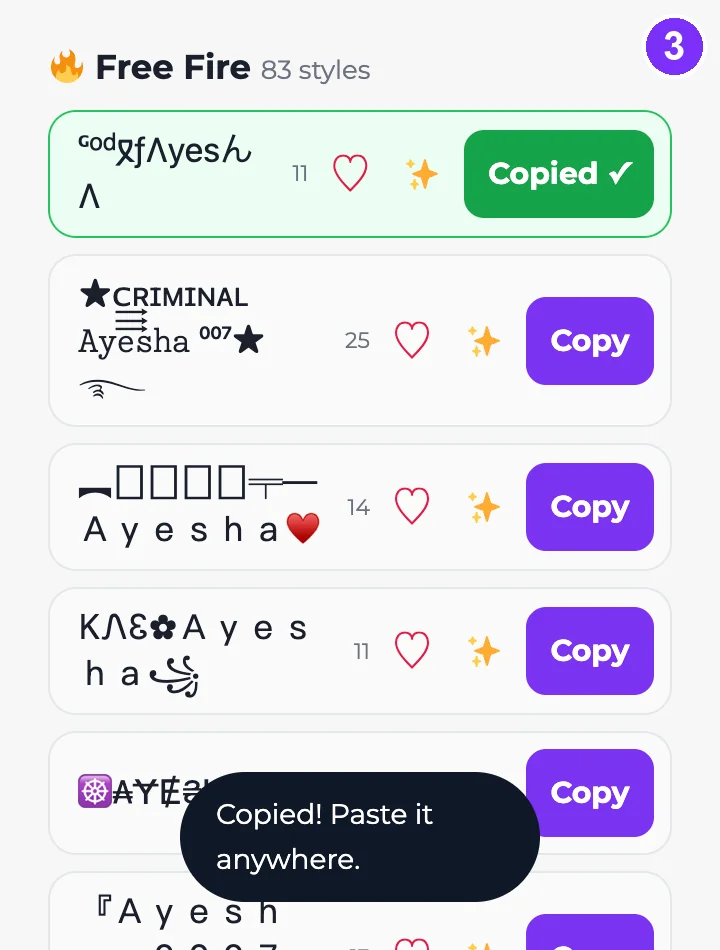
Popular name styles with examples
Here is how the name “Rahul” looks in some of the most-used styles. Type your own name in the box above to get all of them instantly.
| Style | Example | Popular for |
|---|---|---|
| Bold | 𝐑𝐚𝐡𝐮𝐥 | Instagram name, bio |
| Cursive (script) | 𝓡𝓪𝓱𝓾𝓵 | Instagram, aesthetic bios |
| Double-struck | ℝ𝕒𝕙𝕦𝕝 | Usernames, gaming |
| Gothic | 𝕽𝖆𝖍𝖚𝖑 | Gaming names |
| Small caps | ʀᴀʜᴜʟ | Free Fire, BGMI – widely supported |
| Bubble | Ⓡⓐⓗⓤⓛ | Cute names |
| Wide (aesthetic) | Rahul | Aesthetic profiles |
| Decorated | ꧁༒☬Rahul☬༒꧂ | Free Fire, PUBG |
| Stars | ★彡 Rahul 彡★ | Gaming, clan names |
Where you can use your stylish name
Stylish names are made of special Unicode characters, so they paste anywhere that accepts text. Each app has its own rules, though:
| Platform | Where to paste | Good to know |
|---|---|---|
| Name field (Edit profile) and bio | Your @username only allows letters, numbers, periods and underscores. Stylish letters work in the Name field and bio, not in the username. | |
| Free Fire, BGMI, PUBG Mobile | Nickname, using the game’s rename option | Games have short name limits and may reject some symbols or show them as boxes. Test your style before spending a rename card. |
| Profile name and About | Keep it short – WhatsApp limits profile names to 25 characters. | |
| Discord | Display name and server nickname | Usernames only allow lowercase letters, numbers, underscores and periods, but display names accept stylish text. |
| TikTok | Name field and bio | Like Instagram, the @username only takes letters, numbers, underscores and periods. |
| Posts, comments and bio | Facebook’s name rules don’t allow unusual characters in profile names, so use styles in posts and bio. |
Why does my stylish name show boxes (□) or question marks?
These styles are not fonts – they are Unicode characters that look like letters. If a phone, game or app doesn’t have a symbol for a character, it shows an empty box or a question mark instead.
- Older Android phones and some games support fewer characters.
- Bold, italic and small caps styles are supported almost everywhere.
- Rare decorations (old scripts, unusual symbols) are the most likely to break.
- Check how it looks on a friend’s phone before you save it in a game.
Tips for a stylish name that works
- Some apps count each fancy letter as two characters, so long styled names can get cut off.
- Keep your @username plain so friends can search for you, and style your display name instead.
- Screen readers can’t read most fancy letters. Keep important information in normal text.
- One style plus one or two symbols usually looks cleaner than many decorations.
How the name style generator works
Unicode – the standard every phone and computer uses for text – includes extra versions of the alphabet: bold, script, double-struck, circled and more. Our generator swaps each letter of your name for its lookalike and adds decorations. The result is normal text, so there is nothing to install and it works wherever you paste it.
Name style for boys (copy & paste)
Tap a name to copy it – or type your own name in the box above to get the same styles with your name.
- 亗 𝐊𝐢𝐧𝐠 亗
- ★ᴄ͢͢͢ʀɪᴍɪɴᴀʟ 𝙺𝚒𝚕𝚕𝚎𝚛 ⁰⁰⁷★࿐
- ♛ 𝓢𝓱𝓪𝓭𝓸𝔀 ♛
- ♛ 𝕾𝖓𝖎𝖕𝖊𝖗 ♛
- ᴹᴿ 𝓖𝓱𝓸𝓼𝓽
- ᴹᴿ ᴠᴇɴᴏᴍ
- ︻デ═一 𝐑𝐚𝐡𝐮𝐥
- ★ᴄ͢͢͢ʀɪᴍɪɴᴀʟ 𝙷𝚞𝚗𝚝𝚎𝚛 ⁰⁰⁷★࿐
- ♛ 𝓐𝓻𝓳𝓾𝓷 ♛
- ♛ 𝕭𝖊𝖆𝖘𝖙 ♛
Name style for girls (copy & paste)
Tap a name to copy it – or type your own name in the box above to get the same styles with your name.
- ♕ 𝔹𝕦𝕥𝕥𝕖𝕣𝕗𝕝𝕪 ♕
- ❀ 𝗖𝗨𝗧𝗘 ᵍⁱʳˡ 𝓠𝓾𝓮𝓮𝓷❀
- ♡〜٩( ˃▿˂ )۶〜♡ 𝙰𝚗𝚐𝚎𝚕
- ♕ 𝓟𝓻𝓲𝓷𝓬𝓮𝓼𝓼 ♕
- ≽^•⩊•^≼ 𝓒𝓾𝓽𝓲𝓮
- ♡⸝⸝> ̫ <⸝⸝♡ Priya
- ♕ 𝔹𝕒𝕣𝕓𝕚𝕖 ♕
- ❀ 𝗖𝗨𝗧𝗘 ᵍⁱʳˡ 𝓐𝔂𝓮𝓼𝓱𝓪❀
- ♡〜٩( ˃▿˂ )۶〜♡ 𝙳𝚘𝚕𝚕
- ♕ 𝓟𝓪𝓻𝓲 ♕
Name style in Hindi and Urdu (copy & paste)
Symbols and frames work around any alphabet. Tap to copy – or type your name in Hindi or Urdu above and open the 🌏 tab:
- ꧁ राहुल ꧂
- ★彡 प्रिया 彡★
- 『अर्जुन』
- ♥ सना ♥
- ✿ عائشہ ✿
- ︻デ═一 علی
- ꧁ زینب ꧂
- ★彡 حمزہ 彡★
Nickname ideas and guides
Looking for a name idea, not only a style? Start here:
- 💕 Nicknames for girlfriend
- 💙 Nicknames for boyfriend
- 🤝 Nicknames for best friend
- 👫 Nicknames for brother and sister
- 📸 Instagram username ideas
- 🔥 How to change your name in Free Fire
Frequently asked questions
Is this name style generator free?
Yes. It is completely free and you don’t need to sign up or install anything.
Do stylish names work on Instagram?
Yes, in your Name field and bio. Your @username can only use letters, numbers, periods and underscores, so stylish letters won’t work there.
How do I use a stylish name in Free Fire or BGMI?
Type your name above, open the Free Fire or Gaming tab, tap Copy, then paste it when you rename your character in the game. If the game rejects it or shows boxes, try a simpler style such as small caps.
Why do some styles show as boxes?
Your device or app doesn’t have a symbol for that character. Choose a more common style like bold or small caps.
Does it work on mobile?
Yes. The tool works in any mobile or desktop browser, and copying takes one tap.
Are these real fonts?
No. They are Unicode characters that look like styled letters, which is why you can paste them into apps that don’t let you change fonts.
What is the best name style for boys?
Bold, gothic and small caps styles with one symbol – like 👑, ☠ or 亗 – are the most popular. Copy one from the boys list above or type your own name.
Can I write my name style in Hindi or Urdu?
Yes. Type your name in Hindi or Urdu letters and open the 🌏 Hindi / Urdu / Arabic tab – the symbols and frames work around any alphabet.